
What is YouTube video ideation, and why does it matter more than editing? YouTube video ideation is the structured process of finding, shaping and validating an idea before you film it, using audience demand, competitor outliers, content gaps and channel fit. It matters more than editing because a well-executed video on a topic nobody wanted still fails, while a mediocre execution of a wanted idea usually finds an audience.
Why YouTube Video Ideation Decides the Video Before You Film It
Every creator has shipped the video that hurt. Ten hours of filming, six hours of editing, a thumbnail you were proud of, and 340 views. The instinct afterwards is to blame the edit or the algorithm. Almost always, the loss happened weeks earlier, at the idea.
More than 500 hours of video are uploaded to YouTube every minute, according to YouTube's own press figures. You are not competing for attention with an empty shelf. You are competing with everything already made on your topic, and the only real lever you control before filming is whether the idea was worth making at all.
The Hidden Cost of Skipping Ideation
Skipping this step is not just a views problem, it is a burnout problem. An Awin Group creator survey found that 73 percent of creators and influencers experience burnout at least some of the time, and that constantly having to come up with new ideas ranks among the most cited causes, named by roughly half of respondents. Creative fatigue was the single most common driver at 40 percent.
Read that again, because it reframes the problem. The exhausting part of YouTube is not the filming. It is waking up every week with a blank page and no system. A repeatable ideation process is a mental health feature as much as a growth one.
Step 1: Start With the Audience, Not the Topic
The most common ideation mistake is asking "what should I make a video about?" The better question is "which viewers am I trying to reach, and what are they already watching?"
This matches how the platform actually works. YouTube's recommendation system is a personalization engine that predicts whether a specific viewer will enjoy a specific video right now, built from watch history and session behaviour rather than broad topic labels. Sprout Social's 2026 algorithm breakdown and YouTube's own search and discovery documentation both land in the same place: your video is shown to people, not to a category.
So the useful unit of ideation is not "cooking" or "productivity". It is "the person who watched three knife-skill videos last night and is still not confident dicing an onion".
Step 2: Harvest Demand Signals You Already Own
Before touching an external tool, mine what your channel already tells you:
- Search terms in YouTube Analytics that brought viewers to you
- Suggested video traffic sources, which reveal what YouTube thinks you are adjacent to
- Comment questions, especially the same question asked repeatedly
- Your own outliers, the videos that beat your channel average on click-through rate
Then widen out with Google Trends to check whether interest in a subject is climbing or fading, and YouTube's search autocomplete to see the phrasing real people use. Our step-by-step guide to finding trending YouTube video topics covers this research layer in more depth.
Step 3: Study Outliers, Not Averages
An outlier is a video that dramatically beat its own channel's normal performance. That gap is the signal, because it isolates the idea from the creator's subscriber count.
When you find one, do not copy the topic. Ask what made it break out:
- Was it the angle (a contrarian take, a specific number, a named failure)?
- Was it the format (a teardown instead of a tutorial)?
- Was it timing (first credible video after a platform change)?
Outlier study tells you which shapes of idea are currently rewarded in your niche. That is far more transferable than the topic itself.
Step 4: Find the Gap Between Demand and Supply
A content gap is a mismatch between what viewers want and what already exists. The best gaps are rarely untouched subjects, they are subjects covered badly. Existing videos are outdated, too shallow, aimed at beginners when experienced viewers need help, or simply never answer the question in the title.
Score each candidate on two axes:
| Demand | Supply quality | Verdict |
|---|---|---|
| High | Weak or outdated | Film it now, this is the sweet spot |
| High | Strong and recent | Only enter with a genuinely new angle |
| Low | Weak | Fine as evergreen depth, not as a growth bet |
| Low | Strong | Skip |
That single table kills more bad ideas than any brainstorming session.
Step 5: Package the Idea Before You Commit
Topic, title and thumbnail have to work as one unit, and the fastest way to test an idea is to write its packaging first. If you cannot draft a title you would click and describe a thumbnail in one sentence, the idea is still too vague to film.
Write three title variations. If all three are boring, the problem is the idea, not your copywriting. This is also the cheapest possible moment to discover that. Once packaging holds up, our guide to thumbnails that protect your click-through rate covers the execution side.
Step 6: Score the Idea Instead of Arguing About It
Gut feel does not scale, and it does not survive a bad week. Give every candidate a number across the same criteria:
- Demand — is anybody actually searching for or watching this?
- Competition gap — can you beat what already ranks?
- Channel fit — does your existing audience signal match?
- Format viability — can it be made visually watchable?
- Your energy — will you still care in edit three?
Anything scoring well on four of five is a green light. Anything scoring badly on channel fit is a trap, no matter how exciting the trend is.
Step 7: Close the Loop After Publishing
Ideation is a flywheel, not a one-off. After each upload, record which idea attributes correlated with performance: format, angle, title pattern, length. Within a few months you stop guessing what your specific audience wants, because you have your own data instead of generic advice.
This is exactly the loop most creators skip, and it is why two channels with identical effort diverge after a year.
How Creator AI Automates YouTube Video Ideation
Running the seven steps by hand takes one to two hours per video. Creator AI compresses it into a single run, and it is the reason our ideation feature exists at all.
Here is what actually happens when you hit generate:
- Channel intelligence loads first. Creator AI uses what it learned from your real videos, tone, pacing, themes, humour style, structure, so ideas are shaped for your channel rather than a generic niche.
- Live trend intelligence is gathered. The pipeline pulls trending videos in your niche and runs a web-grounded search pass to build a snapshot of rising topics with momentum scores, saturated topics to avoid, early signals, niche gaps and competitor breakouts.
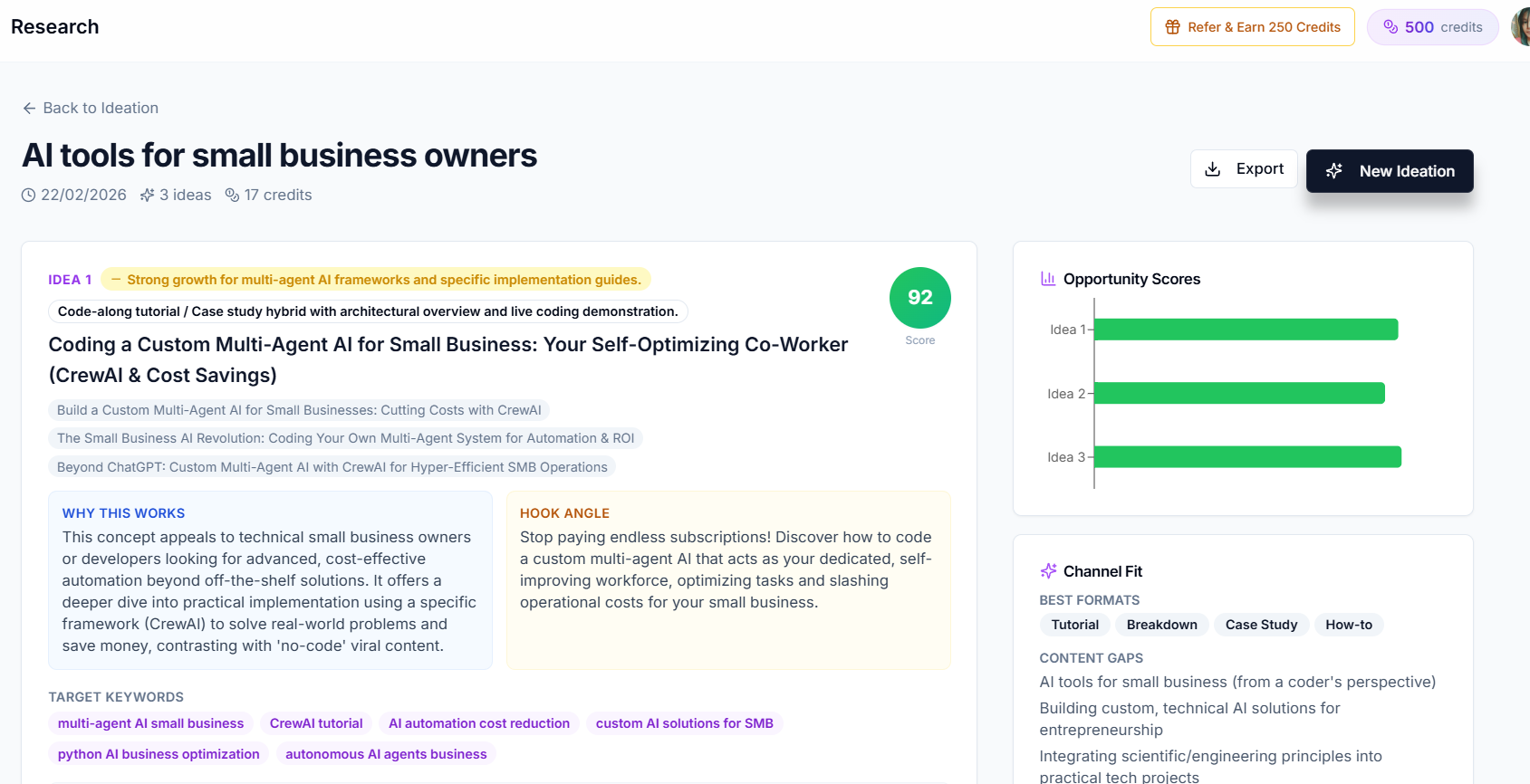
- Ideas are synthesized. Each idea comes back with a primary title plus alternate title variations, the core topic, a unique angle, why it works, a first-15-seconds hook concept, target keywords, a suggested format, talking points, source signals and a search-intent summary.
- A differentiation check runs last. Every idea is compared against your previous ideation runs and the competitor set, so you do not get handed a topic you already covered or a carbon copy of the video that is already winning.
Each idea carries an opportunity score from 0 to 100 combining trend momentum, competition gap and channel fit, plus a rising, stable or declining momentum label. You also get a channel-fit summary listing your best formats, your content gaps and the title patterns that suit your channel. Results export as PDF or JSON, so a shortlist can go straight into your production board.
Every plan gets the same ideation capability, up to 20 ideas per run, with usage bounded by credits rather than feature locks. See what is included or compare plans.
A YouTube Video Ideation Checklist You Can Steal
Before an idea earns a filming slot, it should pass all six:
- There is evidence of demand, not a hunch
- Existing coverage is weak, outdated or badly packaged
- The topic sits inside your audience's proven interests
- You can draft a title you would click and a thumbnail in one line
- The format is visually makeable with the gear you own
- You are still interested in it 48 hours later
Print it, pin it above the desk, and refuse to film anything that fails two or more.
The Real Payoff
Good YouTube video ideation is not about finding one viral idea. It is about permanently removing the blank page from your week. Creators who systematize this stop producing videos in bursts of anxiety and start producing them on a schedule, because the shortlist is always full and always scored.
That predictability compounds. A channel that publishes twelve validated ideas a quarter will beat a channel that publishes twenty unvalidated ones, every time, with less work and considerably less burnout.
Keep Reading
- How to Find Trending YouTube Video Topics (Step-by-Step)
- Story Structure 101: Plan Videos That People Actually Finish
- How to Write YouTube Scripts That Get More Views
- Turn a scored idea into a full script in one workflow, get started free.
- References: YouTube search and discovery, Google Trends, and the Awin creator burnout survey.