
The Subtitle Advantage
Here's a stat that might surprise you: videos with subtitles saw up to 40% more viewing time than those without, according to a PLYmedia trial across 50 countries. In other words, subtitles boost YouTube views for reasons that have nothing to do with luck. And yet, most creators still skip this step.
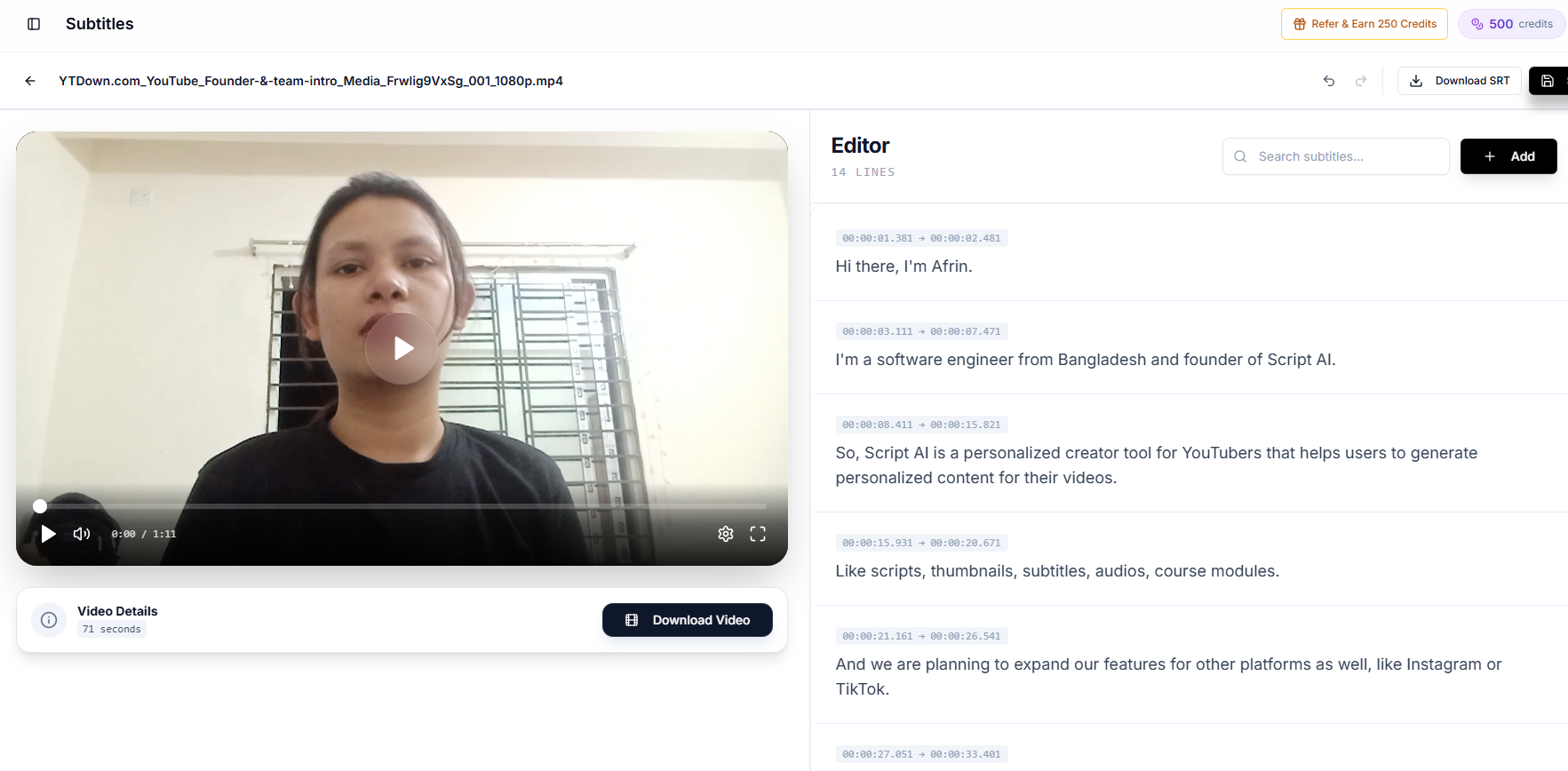
Why? Because adding subtitles has traditionally been tedious, expensive, and time-consuming. But that's changing fast.
Why Subtitles Drive More Views
1. Silent Viewing Is Massive
85% of Facebook videos are watched without sound. On YouTube, the number varies by niche, but a significant portion of viewers, especially on mobile, watch with sound off or low.
If your video relies entirely on audio, you're losing these viewers. Subtitles keep them engaged.
2. Global Reach
Only about 25% of YouTube's audience is English-speaking. Subtitles (especially in multiple languages) make your content accessible to the other 75%. YouTube's algorithm also indexes subtitle text, making your video discoverable in more languages.
3. Improved Comprehension
Even for native speakers, subtitles improve comprehension. Technical topics, fast talkers, or creators with accents all benefit. When viewers understand more, they watch longer, and watch time is the metric that matters most.
4. SEO Benefits
YouTube can index the text in your subtitles. This means more keywords, more search visibility, and more organic discovery. Subtitles are essentially free SEO.
5. Accessibility and Global Reach
Over 5% of the global population has significant hearing loss. Subtitles make your content accessible to this audience and align with WCAG captioning practices, the same standards organizations follow for ADA-aligned digital content. Captions also help viewers in sound-off environments: commutes, offices, and late-night scrolling.
That's not just the right thing to do, it expands who can watch, share, and subscribe.
The Traditional Subtitle Problem
Manually creating subtitles for a 10-minute video takes 1–2 hours. Professional subtitle services charge $1–3 per minute of video. For creators publishing weekly, this adds up fast.
Auto-generated YouTube subtitles exist but are notoriously inaccurate, misspelled words, wrong timing, and missing context make them unreliable.
How Creator AI Makes Subtitles Easy
Creator AI's subtitle feature:
- Upload your video and get AI-generated subtitles in minutes
- High accuracy using advanced speech recognition
- Export in SRT or VTT format for any platform
- Burn subtitles into your video for guaranteed display
- Edit and refine with an intuitive interface
What used to take hours now takes minutes. No technical skills needed.
What the Data Shows
- 40% more viewing time with subtitles (PLYmedia, 2009)
- 80% higher completion rates for subtitled content
- 16% higher engagement (likes, comments, shares)
- 12% increase in subscriber conversion from subtitled videos
These figures come from channels that added captions to existing libraries, a practical proof point that subtitles pay off without reshooting content.
Why Subtitles Boost YouTube Views (The Mechanism)
It's worth understanding why subtitles boost YouTube views, because the mechanism tells you how to get the most out of them. Three feedback loops stack on top of each other.
First is the retention loop. Captions keep sound-off and mobile viewers watching, which lifts average view duration. YouTube reads longer watch time as a quality signal and recommends the video to more people, so the initial retention bump compounds into more impressions. That is the core reason subtitles boost YouTube views rather than just improve accessibility.
Second is the discovery loop. YouTube indexes your caption text, so an accurate subtitle track effectively doubles the keywords your video can rank for. More search surfaces mean more entry points, and every new viewer who stays feeds the retention loop above. Sloppy auto-captions undercut this, misspelled words index the wrong terms, which is exactly why accuracy matters.
Third is the global loop. Add translated captions and you unlock the ~75% of YouTube's audience that isn't English-first. Each language is a fresh pool of viewers who can now understand, finish, and share your video. Stack all three loops and it becomes clear why subtitles boost YouTube views so reliably across niches: they improve the exact signals, watch time, searchability, and reach, that the algorithm optimizes for.
The practical implication: don't treat captions as a compliance checkbox you add last. Treat them as a growth lever, generate them accurately for every upload, and, where it's worth it, translate them. Do that consistently and subtitles boost YouTube views on old videos and new ones alike, without you filming a single extra second.
Start Today
If you're not adding subtitles to your videos, you're leaving views on the table. Creator AI makes it effortless. Upload, generate, export, done.
And don't forget your back catalog. The fastest win here is retroactive: adding accurate captions to videos you published months ago can lift their watch time and search visibility without any new filming, which is why creators who do a one-time caption pass across their library often see old uploads quietly climb again. New or old, the pattern holds, subtitles boost YouTube views wherever you apply them, so make them a permanent part of your publishing checklist rather than an afterthought you reserve for your biggest videos. The creators who treat captions as core infrastructure, not a nice-to-have, are quietly winning searches, watch time, and international audiences that their caption-free competitors never even show up for. It's one of the rare growth levers that costs almost nothing, works on content you've already made, and keeps paying off for as long as the video stays online. Few optimizations in all of YouTube offer that combination of low effort and durable, compounding upside, which is exactly why skipping captions is a mistake you can't afford to keep making.
Keep Reading
- How AI Is Changing YouTube Content Creation in 2026
- How to Find Trending YouTube Video Topics (Step-by-Step)
- Auto-generate SRT/VTT subtitles with the YouTube subtitle generator on Creator AI, create your free account.
- See YouTube's guide on adding captions and subtitles.
Frequently Asked Questions
Do subtitles really increase YouTube views?
Yes. Many videos see up to 40% more views with subtitles because they keep silent and mobile viewers engaged, improve comprehension, and lift completion rates, the watch-time signals YouTube rewards.
Do subtitles help YouTube SEO and ranking?
Yes. YouTube indexes subtitle text, so captions add keywords and context that make your video discoverable in more searches and languages, essentially free SEO.
What's the difference between SRT and VTT subtitle files?
Both are timed caption formats. SRT is the most widely supported plain-text option; VTT (WebVTT) is built for the web and supports extra styling and positioning. Creator AI exports both.
How do I add subtitles to a YouTube video for free?
Upload your video to Creator AI to auto-generate accurate subtitles in minutes, then export as SRT or VTT or burn them into the video, no manual transcription required.