
Which AI video idea generator should a YouTube creator actually use? Pick based on what the tool proves, not how many ideas it produces. Keyword-led tools like vidIQ and TubeBuddy suit SEO-driven channels, outlier tools like 1of10 and OutlierKit suit creators hunting proven breakout formats, and Creator AI suits creators who want ideas scored against their own channel and carried straight through to a script.
Idea Volume Is Not the Problem
Every AI video idea generator on the market can hand you fifty titles in ten seconds. That has been solved for years. The problem is that forty-eight of them are wrong for you, and the tool has no opinion about which two are not.
That is the whole evaluation. A good AI video idea generator is not a list machine, it is a filter, and the questions worth asking are simple: what evidence sits behind each idea, does the tool know anything about my channel, and does the idea arrive concrete enough to film?
The Five Criteria We Compared On
- Evidence — does each idea come with demand or outlier data, or is it a hallucinated title?
- Channel fit — does the tool know your tone, themes and back catalogue?
- Packaging depth — do you get an angle, hook and format, or just a headline?
- Workflow reach — can the idea become a script, or does it stop at the shortlist?
- Price honesty — what does the AI tier actually cost, not the headline plan?
The Comparison Table
| Tool | Ideas come from | Channel-aware | Output depth | Published price |
|---|---|---|---|---|
| [vidIQ](https://vidiq.com/) | Keyword scores, daily AI idea feed | Partly, via connected channel | Titles, keywords, coaching prompts | Boost from about 17.50 USD/mo annual |
| [TubeBuddy](https://www.tubebuddy.com/) | Keyword explorer, tag and topic tools | Partly, via YouTube Studio integration | Titles, tags, A/B test tooling | Legend from about 14.50 USD/mo |
| [1of10](https://1of10.com/) | Outlier videos across niches | No, niche-level | Outlier titles, AI title and idea gen | Free tier, AI features on Pro at about 69 USD/mo |
| [OutlierKit](https://outlierkit.com/) | Outlier discovery, credit-based research | No, niche-level | Outlier data, research credits | Hobby from about 199 USD/yr |
| ChatGPT or Claude | Model priors, no live platform data | No | Titles and rough outlines | From free, 20 USD/mo tiers |
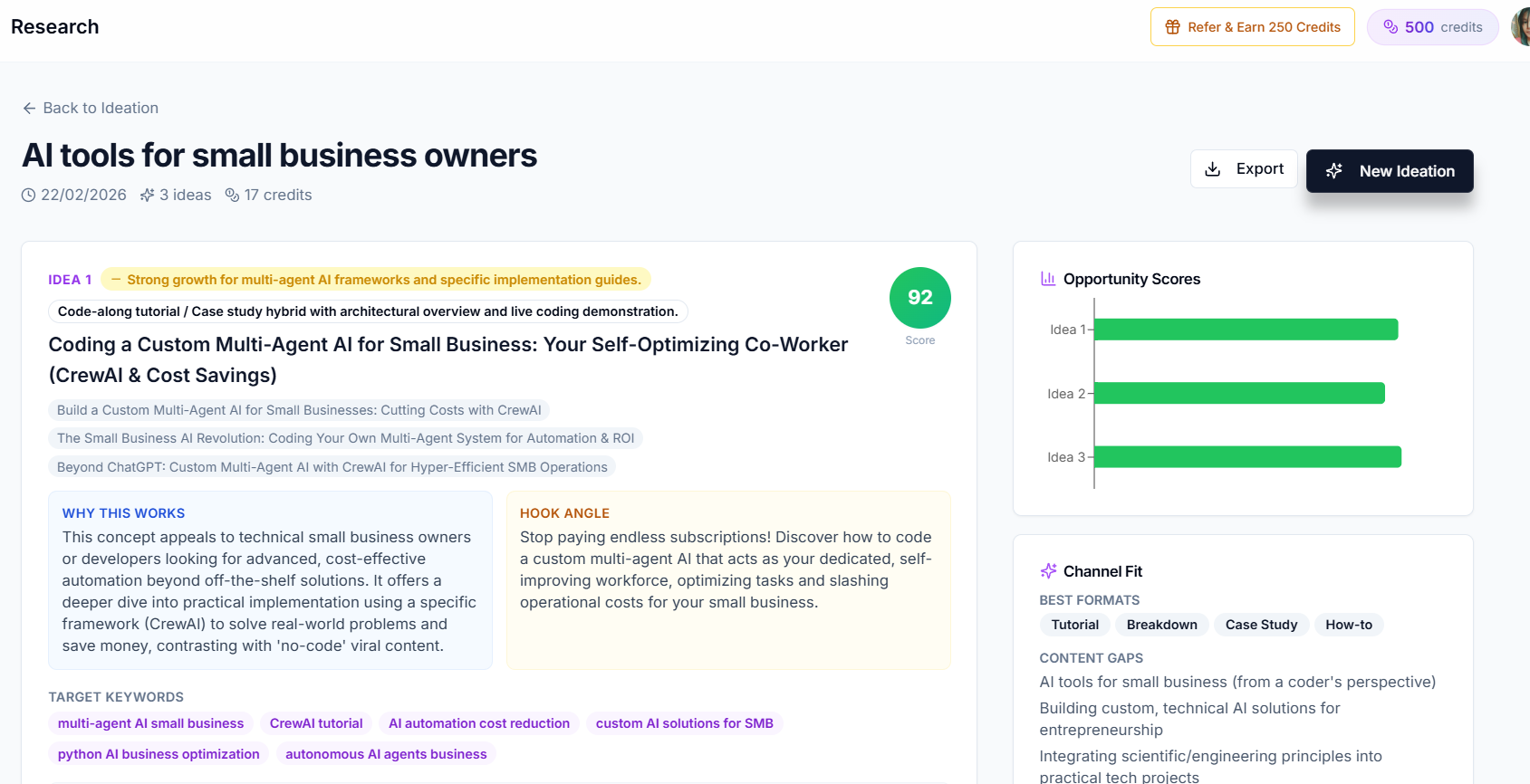
| Creator AI | Live trend pass plus your trained channel profile | Yes, trained on your real videos | Scored ideas with angle, hook, format, talking points, sources | Included on every plan, [see pricing](/pricing) |
Prices are the vendors' published rates as of mid-2026 and change often. Comparisons like vidIQ versus TubeBuddy are useful for the SEO side of the decision, but check each vendor's own page before subscribing.
Where Keyword Tools Win, and Where They Stop
vidIQ and TubeBuddy earned their user bases honestly. If your growth comes from search, keyword scores, tag suggestions and competitor tag inspection are genuinely useful, and TubeBuddy's A/B testing is a real advantage for packaging.
Their limit as an AI video idea generator is that keywords describe demand, not opportunity. A keyword with a great score and four excellent existing videos is a bad idea, and a keyword tool will happily show it to you in green.
Where Outlier Tools Win, and Where They Stop
1of10 and OutlierKit approach ideation from the opposite direction: find videos that massively outperformed their channel's average, and reverse-engineer the pattern. This is the single best signal for format discovery, because it strips out subscriber count and isolates the idea.
The limit is fit. An outlier proves a format worked for somebody's audience. It cannot tell you whether it will work for yours, and it does not know what you already published. Note also that 1of10's AI generation sits on its higher tier rather than the entry plan, which changes the maths for small channels.
Why a General Chatbot Is the Weakest AI Video Idea Generator
Asking ChatGPT or Claude for video ideas feels productive because output arrives instantly. But a general model has no live view of YouTube, no access to your analytics, and no memory of your last thirty uploads. It predicts what a plausible video title looks like, which is why the suggestions skew toward topics that were popular in its training data and that thousands of other creators are being handed the same week.
We went deeper on that failure mode in why generic AI tools do not work for YouTube creators. The short version: no evidence, no fit, no scoring.
What Creator AI's Ideation Actually Does
Creator AI built ideation as a four-stage pipeline rather than a prompt, because the value is in the filtering, not the generating.
Stage 1, channel intelligence. It loads the profile learned from your real videos, tone, vocabulary level, pacing, recurring themes, humour style and structure, so every idea is shaped for your channel instead of an average one.
Stage 2, trend intelligence. It pulls trending videos in your niche and runs a web-grounded search pass, producing a snapshot with momentum-scored trending topics, saturated topics to avoid, early signals that are low volume but accelerating, under-served niche gaps and competitor breakout videos.
Stage 3, synthesis. Each idea returns with a primary title, two to three title variations, the core topic, a unique angle, why it works, a first-15-seconds hook concept, target keywords, a suggested format, talking points, reference links and a search-intent summary, plus an opportunity score from 0 to 100 and a rising, stable or declining momentum label.
Stage 4, differentiation. Every idea is checked against your previous ideation runs and the competitor set, so you are not handed a topic you already covered or a near-duplicate of the video already winning that search.
You also get a channel-fit read: your best formats, your content gaps and the title patterns that suit your channel. Ideas export to PDF or JSON, and up to 20 ideas per run is available on every plan, with usage bounded by credits rather than feature gates.
The Gap Every Idea Tool Shares (Except One)
Here is the honest structural point. Almost every AI video idea generator ends at the shortlist. You still open a different tool to write the script, a third to make the thumbnail, and a fourth for subtitles or dubbing.
That handoff is where the research dies. The angle, hook and talking points that made an idea good rarely survive being retyped into a blank document. Creator AI's ideation feeds directly into scripting, story structure, thumbnails and subtitles, which is less a feature claim than the reason the pipeline outputs hooks and talking points at all. If you want the retention side of that chain, audience retention and watch time is the next read.
How to Choose in Under Two Minutes
- Search-driven channel, tight budget: TubeBuddy for the price and A/B testing.
- Keyword research plus a daily idea feed: vidIQ.
- Format hunting across niches: 1of10 or OutlierKit, budget for the AI tier.
- You already pay for a script tool and want one workflow: Creator AI.
- You are validating whether ideation tools help at all: start with free tiers plus Google Trends before spending anything.
The Bottom Line
The best AI video idea generator is the one that makes your decisions cheaper, not your list longer. Judge candidates on evidence, channel awareness and how much of the idea survives into production, and most of the market thins out quickly.
Whichever tool you choose, keep the discipline: an idea earns a filming slot when demand is demonstrable, existing coverage is beatable, and the fit with your audience is real. Software can gather that evidence in minutes. Deciding what to do with it stays your job, and that is the part worth your hours.
Keep Reading
- YouTube Video Ideation: The 7-Step System That Beats Guessing
- How to Find Trending YouTube Video Topics (Step-by-Step)
- Why Generic AI Tools Don't Work for YouTube Creators
- Go from scored idea to finished script in one place, start free.
- References: vidIQ, TubeBuddy, 1of10, OutlierKit pricing comparison.