
Beyond Text Generation
Generic AI tools like ChatGPT, Gemini, and Claude are impressive text generators. But YouTube content creation requires much more than text, and that gap is exactly why a dedicated YouTube AI tool exists. Here are five things Creator AI, a purpose-built YouTube AI tool, does that generic chatbots simply can't.
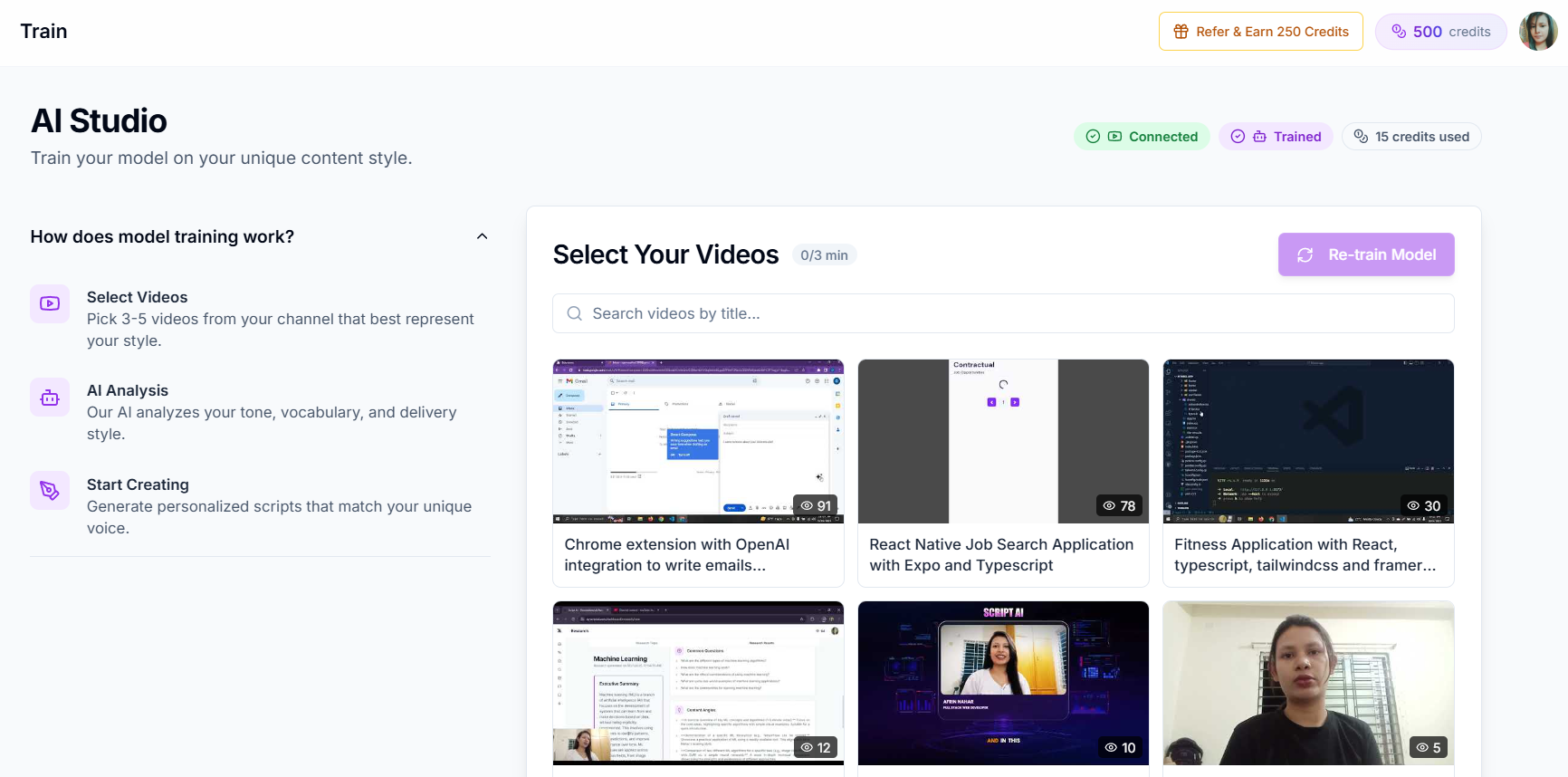
1. Learns Your Unique Voice from Your Channel
Generic AI: You describe your style in a prompt and hope for the best. Every session starts from scratch.
Creator AI: Connects to your YouTube channel, analyzes your existing videos, and builds a persistent voice profile. It picks up your:
- Vocabulary and word choices
- Sentence rhythm and pacing
- Humor style and personality
- Intro/outro patterns
- How you transition between topics
The result? Scripts that your audience would never guess were AI-assisted because they sound exactly like you.
2. Generates YouTube-Ready Thumbnails
Generic AI: Can describe what a good thumbnail might look like, or generate a generic image that doesn't match YouTube's requirements.
Creator AI: Generates actual thumbnails designed for YouTube, with the right dimensions, bold text, high-contrast visuals, and emotional triggers that drive clicks. Your thumbnail is ready to upload, no Photoshop needed.
3. Creates and Exports Subtitles
Generic AI: Can't process video or audio files at all.
Creator AI: Upload your video and get AI-generated subtitles in minutes. Export in SRT or VTT format, or burn them directly into your video. Subtitles boost your views by up to 40% and make your content accessible to a global audience.
4. Dubs Your Content Into 24+ Languages
Generic AI: Can translate text, but can't produce dubbed audio or video.
Creator AI: Takes your video and creates dubbed versions in over 24 languages with natural-sounding AI voices. Reach audiences in Spanish, Hindi, Portuguese, Japanese, and more, without hiring voice actors or learning new languages.
5. End-to-End Workflow in One Dashboard
Generic AI: You need ChatGPT for scripts, Canva for thumbnails, a subtitle tool, a dubbing service, and a note app for ideas. That's five tabs and five subscriptions.
Creator AI: Everything lives in one place:
- Script generation with your voice
- Thumbnail creation
- Subtitle generation and export
- Video dubbing
- Idea research and trend analysis
- Story blueprint planning
One tool. One subscription. Zero context-switching.
What to Look for in a YouTube AI Tool
Not every "AI for creators" product earns the name. When you evaluate a YouTube AI tool, weigh it against the five capabilities above and these buying criteria:
- Channel memory. Does it learn from your actual uploads, or just take a text prompt? A real YouTube AI tool builds a persistent voice profile so drafts sound like you on day one and day one hundred.
- Native assets, not descriptions. It should output a finished 1280×720 thumbnail and an SRT file, not a paragraph describing what those should look like.
- Retention structure baked in. Hooks in the first 10 seconds, open loops, and pattern interrupts should be automatic, because that is what YouTube's algorithm rewards.
- One workflow. Scripts, thumbnails, subtitles, dubbing, and ideas in a single dashboard beat five subscriptions and five tabs.
A Real Workflow With a YouTube AI Tool
Here is what a Tuesday looks like when a YouTube AI tool replaces the duct-taped stack. You open one dashboard and paste your topic. In three minutes you have a voice-matched script with a hook already written for retention. One click generates a thumbnail sized and styled for clicks. You upload the rough cut and the same YouTube AI tool returns burned-in subtitles plus an SRT export. Before lunch, it dubs the finished video into Spanish and Hindi in a natural voice.
That entire sequence, scripting to multi-language publishing, used to mean ChatGPT, Canva, a caption app, a dubbing service, and a notes doc. Consolidating it into a single tool is not just tidier; it removes the context-switching tax that quietly slows every upload. The creators who publish twice as often in 2026 are rarely working twice as hard, they simply stopped duct-taping tools together and let one platform carry the whole pipeline.
The Hidden Cost of Sticking With Generic AI
The stacked-tool approach has a price that never shows up on an invoice: your time and your consistency. Every handoff between apps is a chance to lose the thread, a thumbnail that no longer matches the hook, subtitles that miss the joke, a dub that flattens your delivery. Multiply that friction across 50 uploads a year and it is the difference between a channel that compounds and one that stalls.
There is a money cost too. Five separate subscriptions, a script generator, an image tool, a caption service, a dubbing platform, and a research app, routinely add up to more than one integrated plan, while delivering a worse result because none of them talk to each other. Generic chatbots feel free until you count the tabs, the exports, and the hours spent stitching outputs together. The math almost always favors consolidation, which is why so many creators who started on ChatGPT eventually move their whole workflow into a single dashboard built for video.
The Bigger Picture
The difference isn't that generic AI is bad, it's that it was built for everything, and therefore optimized for nothing specific. Creator AI was built from day one for one audience: YouTube creators. Every feature, every workflow, every AI model is tuned to help you create better videos, faster.
Stop duct-taping five separate tools together. Start using the single platform that was actually built for creators like you.
Keep Reading
- ChatGPT vs a Dedicated YouTube AI Tool: Which Wins?
- How AI Learns Your YouTube Voice (And Why It Matters)
- See the full toolset on the features page and create your free account.
- Explore official best practices at YouTube Creators.
Frequently Asked Questions
Can ChatGPT generate YouTube thumbnails?
No. ChatGPT is a text model and cannot generate images. Creator AI includes an AI thumbnail generator built specifically for YouTube creators, sized and styled for high click-through rates.
Does ChatGPT learn my YouTube voice?
No. ChatGPT forgets you between sessions. Creator AI connects to your channel and builds a persistent voice profile from your vocabulary, pacing, humor, and structure.
Can ChatGPT create or export subtitles?
No. ChatGPT can't process video or audio. Creator AI generates accurate subtitles and exports them as SRT or VTT, or burns them directly into your video.
What can Creator AI do that ChatGPT can't?
Creator AI learns your voice, generates YouTube thumbnails, creates and exports subtitles, dubs videos into 24+ languages, and runs the full workflow in one dashboard, none of which ChatGPT can do.